Student portal
Where students watch their courses and see their certificates and orders.
Everyone who buys or signs up for free enters a portal that opens with your brand. The portal runs on your subdomain (or on your own domain).
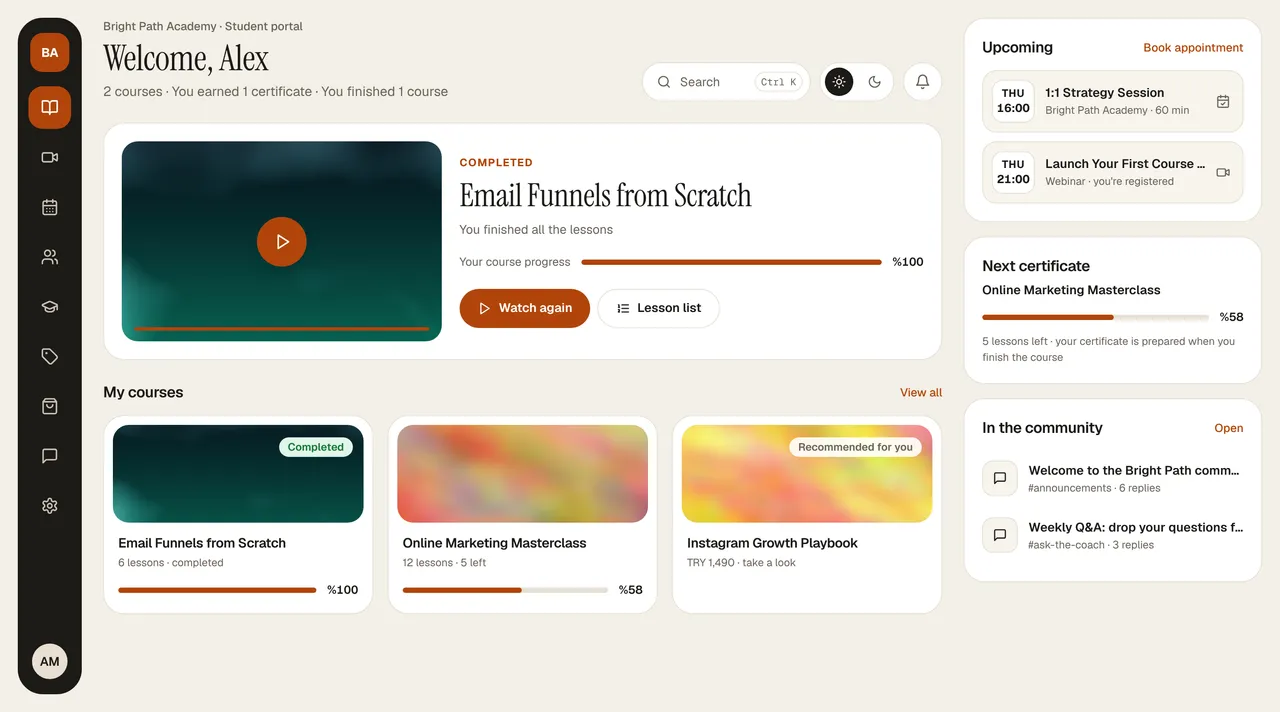
The portal opens in the same layout as your dashboard and in your brand color: a menu on the left, a heading at the top of every page; search, the light/dark theme, and the notification bell on the right; and summary cards in the right column.
- My Courses (home page): where they left off (with module and lesson number), their courses, upcoming webinars and appointments, and their next certificate.
- Webinars: countdown to the next webinar, add to calendar, submit questions in advance; past recordings.
- Appointments: session type, a day from the calendar, an available time; payment if it's paid.
- Community: channels, posts, replies.
- Certificates: issued automatically when a course is finished; PDF, add to LinkedIn, and a verification link.
- Affiliate: referral link, commissions, and payout request (if your program is on).
- Orders: purchases, payment method, e-invoice, and refund request.
- Support: open a request with you and message back and forth.
- Profile: details, notification preferences, password, downloading their data, and deleting their account.
Anyone who clicks “Sign up” on your site registers as your customer; it doesn't create an entrepreneur account.
Step-by-step guides you can send directly to your students are in the Student portal section: signing in, watching courses, certificates, orders and bank transfers, appointments.