Your orders, bank transfers, and refunds
Your purchases, payment status, bank transfer reference, and refund request.
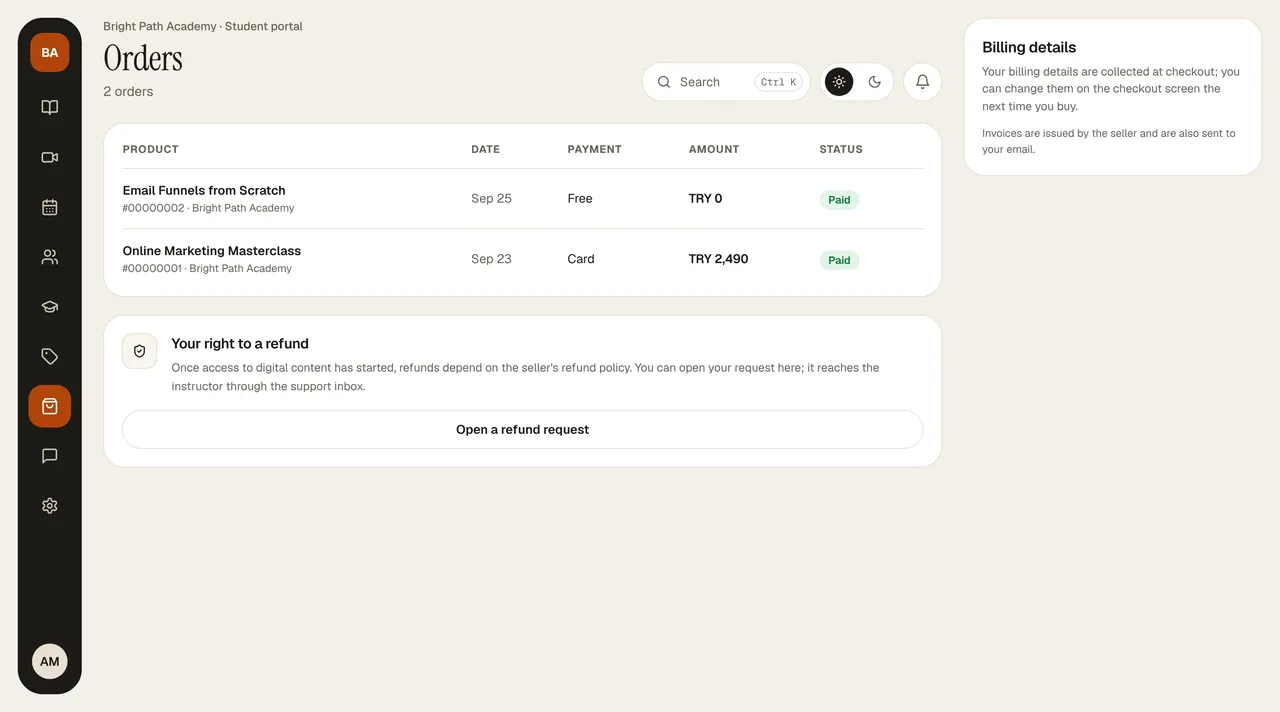
Orders lists all your purchases and subscription payments: the product (with the order number and seller below it), date, payment method (card, bank transfer, coupon, subscription), amount, and status. Give the order number when you write to your instructor.
Statuses
- Paid: the payment was received and your access is open.
- Awaiting payment: the card payment hasn't been completed yet or is awaiting approval.
- Awaiting bank transfer: you chose bank transfer; when the instructor sees the money and approves it, your access opens and a “Your payment was received” email arrives.
- Refunded / Not completed (the payment was interrupted or declined).
When making a bank transfer
Send it to the IBAN shown on the payment screen, and be sure to write the reference code (BT-…) given to you in the description. If the code isn't written, matching is delayed.
Invoice
- The seller (your instructor) issues the invoice and sends it to your email. If your instructor issued an e-invoice through Paraşüt, Invoice appears at the end of the row; click it to open the PDF.
- The Billing details card on the right shows the name/title, type, and city you entered at your last payment; at your next payment you can change them on the payment screen.
Refund
Open a refund request on the Your refund right card opens a request in Support, with the payment type and order details filled in; you write the reason and send it. The terms are on the Cancellation / Refund page at the bottom of your instructor's site. With a full refund, access to the course closes.