Creating an ebook and making a free guide (lead magnet)
Plan, write, edit, cover, and distribution; as a free guide or for sale.
Studio › Ebook has two screens: the library (the new book box and book cards) and the editor that opens when you click a book.
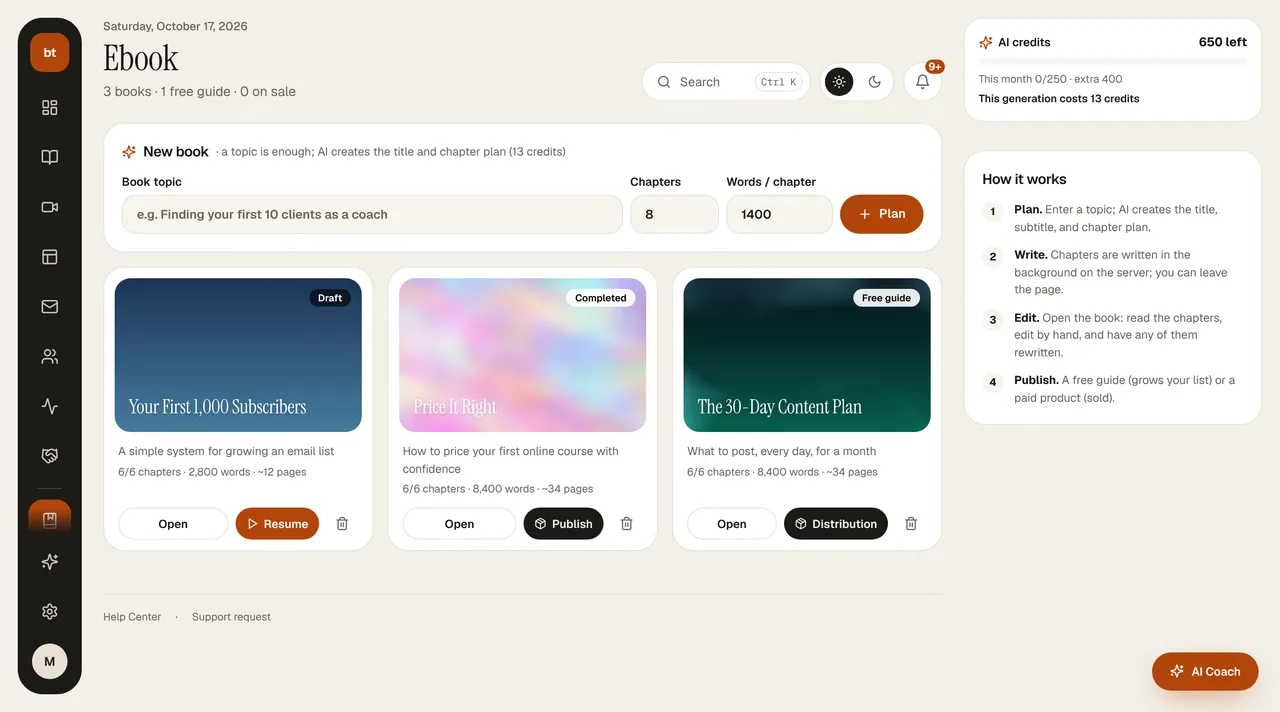
- In the library, enter the topic, the number of chapters, and the words per chapter, then press Plan. The AI produces the title and the chapter plan, and the book opens in the editor.
- Press Write the book. Writing runs on the server in the background, chapter by chapter; it keeps going even if you leave the page. If it stops partway, Continue writing picks up from the chapter where it left off.
- In the editor, Chapters is on the left and the page is in the middle: “Cover and table of contents” or the chapter you selected. With Edit you change the title and text by hand (### subheading, **bold**, - bullet). With Add chapter you open a new chapter and either have the AI write it or fill it in yourself; in edit mode, a chapter can be deleted.
- When the book is done, press Publish: as a free guide (lead magnet) or a priced product; you generate the cover with AI, pick it from the library, or upload it.
Right column
- Distribution: the book's type (free / paid and its price), the download form, the pages that use the book; copying the download link, opening the product.
- Last 30 days: the number of downloads, people who joined your list through the book form, sales, and revenue.
- With AI: write or rewrite a chapter, a cover alternative, a promotional email, and social posts (drafted to the AI Coach). The AI cover creates a topic-appropriate vertical image from the book's title and subject; there is no text on it, and the title is written on the cover page.
CreditsThe book plan costs 13 credits (charged on Plan; no extra credits are charged for the first writing). Rewriting a chapter that has already been written costs 3 credits, and a cover image costs 1 credit.
Credits: the plan gives you one writing allowance per chapter; rewriting, deleting and rewriting, or writing a chapter added later costs 3 credits (see AI credits).