Watching your courses and tracking progress
My Courses, the lesson player, progress, quizzes, and modules with unlock dates.
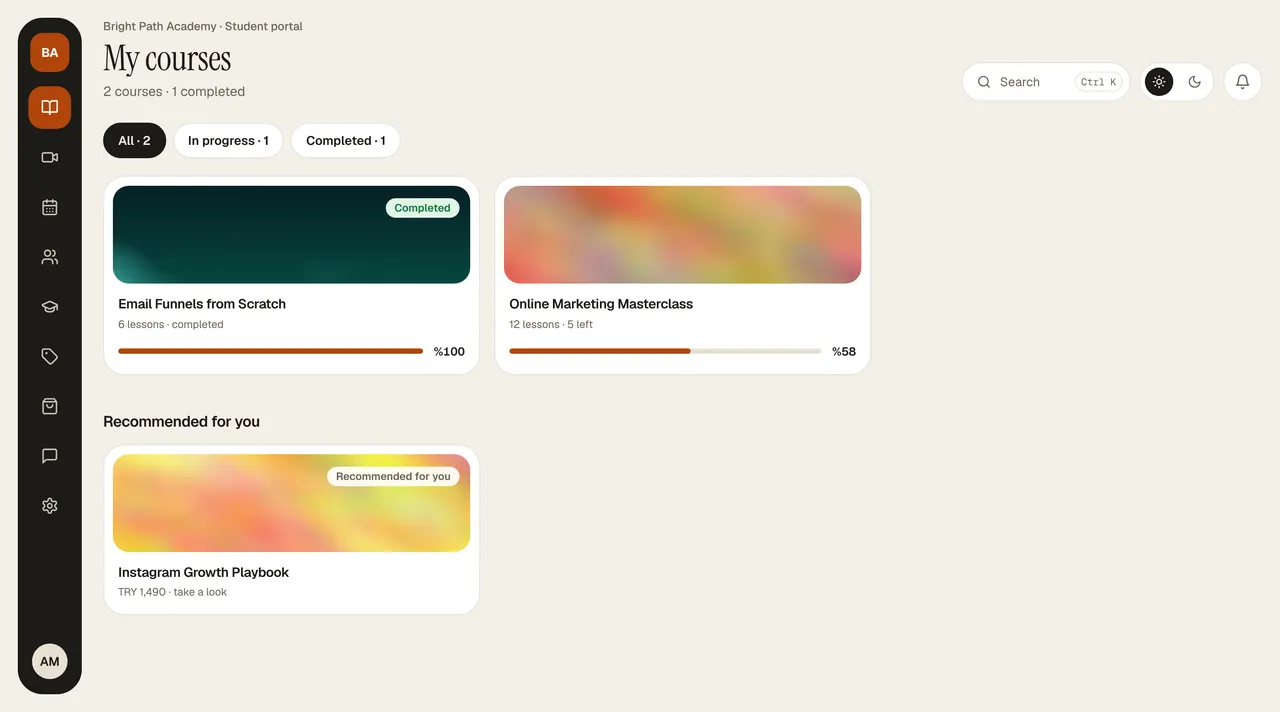
The portal opens on My Courses. At the very top is where you left off: which lesson of which module you're on, your course progress, and Continue. Resume where you left off in the header takes you to the same lesson. Below it, your courses are listed as cards (number of lessons, lessons remaining, progress); All opens all courses with All / In progress / Completed filters. If you have no courses or only a few, the school's other courses appear as Recommended for you.
The right column has Upcoming (your webinars and appointments), Next certificate (the course you've made the most progress on and the lessons remaining), and the latest topics In the community.
Lesson player
- The list on the left has modules and lessons (on a phone, the list opens as a drawer). You move between lessons with Previous / Next.
- Lesson types: video, audio (podcast), PDF/document (Download or preview on the page), link (Open link), text, and quiz.
- Video resumes where you left off.
Progress
When you finish a lesson, press Mark as Completed. The progress percentage is calculated from the lessons you've marked; watching a video to the end does not count the lesson as completed on its own.
Quizzes
A quiz lesson shows the number of questions and the passing score (usually 70%). When you press Submit Answers, the correct answers and explanations are shown. If you don't pass, you can retake it with Try Again; when you pass, the lesson is completed.
Modules with unlock dates
Some courses move along with a group: one module opens each week. A locked module says “This module will open with the group” along with the date it opens; the content isn't visible until then.