Joining and rewatching webinars
Upcoming and past webinars, the join link, automated webinars, and recordings.
Registration, waiting room, and live page
The webinar link your instructor shares (/w/…) opens the registration page: the title, description, countdown, In this session items, and the host are on the left; the date and the registration form are on the right. Enter your name, email, and (optionally) your phone, and press Register for free. Then Go to the waiting room and Add to your calendar appear. The waiting room takes you to the live page automatically when the stream starts; on the live page, the stream is on the left and the Chat is on the right.
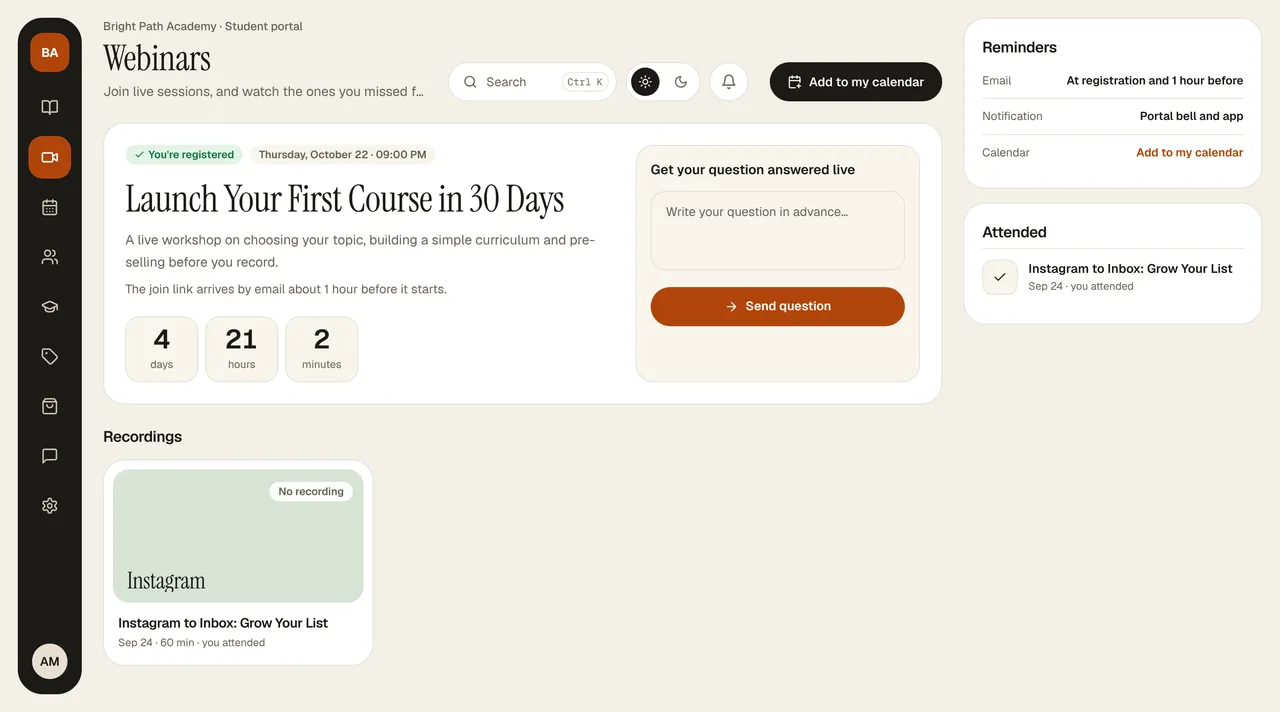
Webinars in the portal
At the top of Webinars is the next webinar as a large card: the date and time, description, and the days / hours / minutes remaining until it starts. Times are shown in Turkey time.
- Add to my calendar: the button in the header downloads the webinar as a calendar file (.ics); it opens in Google, Apple, and Outlook calendars and reminds you 30 minutes before.
- Ask in advance: type your question in the Get your question answered live box on the right of the card and press Send question. The question goes into the instructor's live chat feed.
- Joining: when the webinar is live, Join the stream appears on the card; the join link also arrives in your email about 1 hour before it starts. It opens in the browser; you don't need to download an app.
- Automated webinar: if it says “Watch anytime,” you start it right away with Start watching.
- Recordings: finished webinars are shown as cards at the bottom; if the instructor added the recording, you click the card to rewatch.
- Reminders: they are listed on the card on the right; you can turn off email reminders in Profile › Notifications. Attended is also listed on the right.