Ad Studio
3 different angles from one campaign, ad images and video editable in every size.
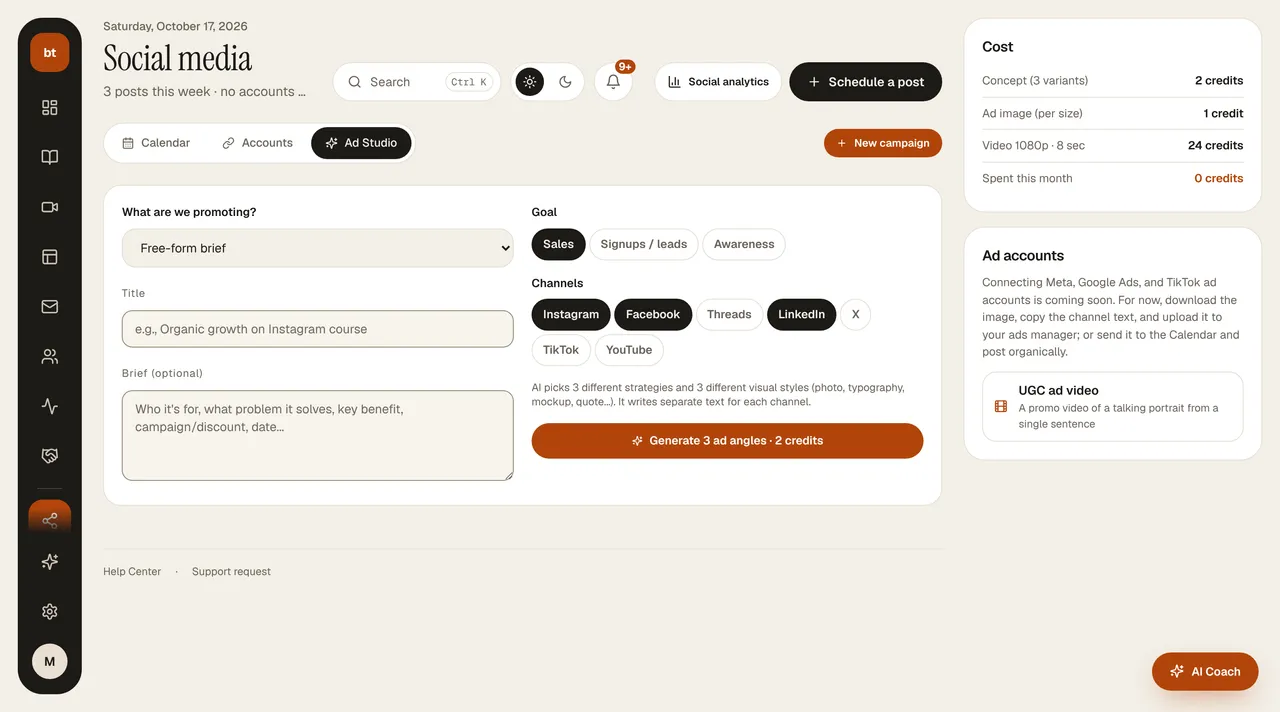
- In Social Media › Ad Studio, click New campaign. Choose the product and the goal.
- AI suggests 3 different angles and a different visual style for each (for example, editorial photo, typographic poster, instructor quote). The angles sit at the top as Variant A, B, C cards; click one and the preview and channel texts switch to that variant.
- Choose an angle, then choose a size (1:1, 4:5, 9:16, 16:9) or Generate all sizes. Images are generated separately for each size, not cropped.
- Change the template, generate a new scene, or edit in Design Studio; download or send to the Calendar.
The right column has Cost (concept, image, video, and the credits spent on ads this month), Ad accounts (Meta, Google Ads, and TikTok connections coming soon; for now you download and upload to the ads manager), UGC ad video, and AI Coach (how to pit the variants against each other).
If available, your instructor photo, logo, and product covers from your Brand Kit are used. Every image generated is automatically checked so that text doesn't land on faces and the framing is right.
CreditsAn ad concept costs 2 credits, an ad image 1, and an ad video 24.