Coupons and upsell
Define discount codes and offer an extra deal after purchase.
Coupons
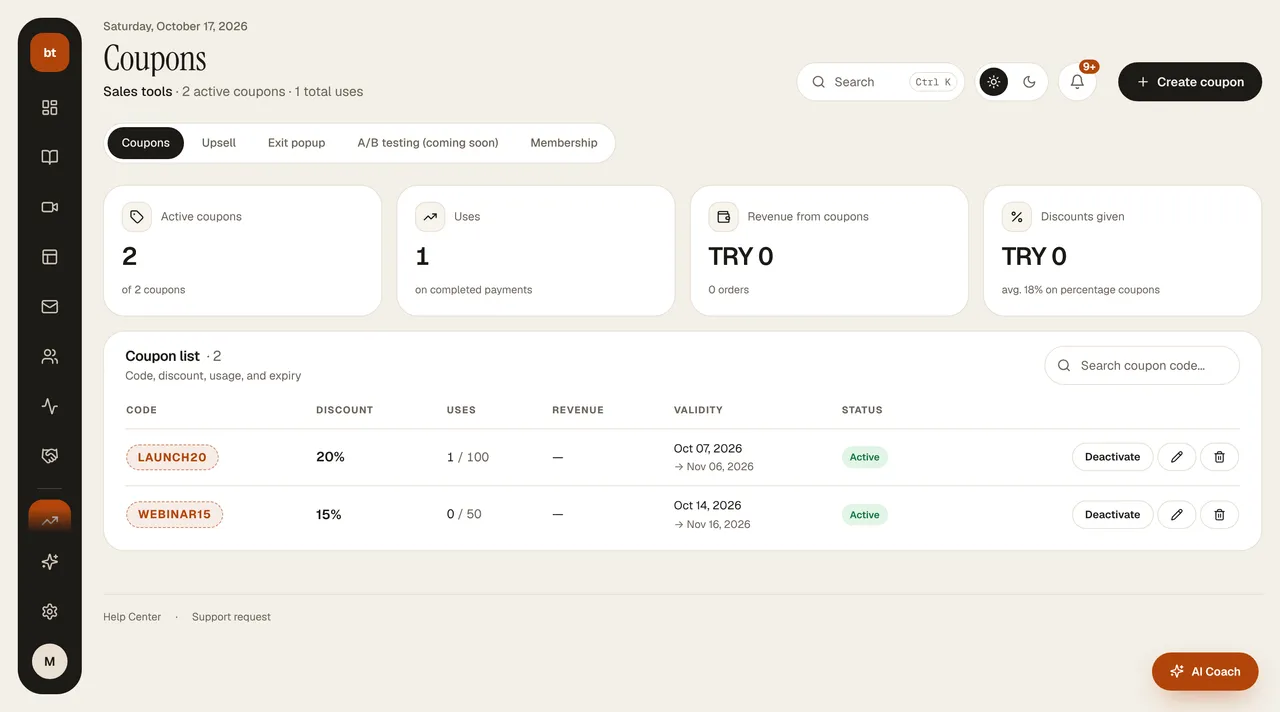
In Sales tools › Coupons you set a percentage or amount discount, an expiry date, a minimum cart amount, and a usage limit.
Your student clicks the Have a coupon code? link in the payment box on your sales page, types the code, and clicks Apply; the discounted price appears right away. The coupon is valid for payment by both card and bank transfer. The discount is calculated on the server from the price you set for the product — it can't be tampered with in the browser.
- A coupon use is counted only when the payment is completed; a coupon left in the cart doesn't use up a redemption.
- A 100% off coupon opens access without asking for payment (for example, gift or judge access).
- On the Coupons page you can see Revenue from coupons, Discounts given, and the revenue of each coupon.
Upsell
After a purchase is completed, you show an additional offer on the thank-you page. If you have a Setup with a course, the fastest way is to add it to the flow on the Setup Canvas with + Add › Upsell offer.