AI Course Tools
Curriculum, quizzes, podcasts, translation, and video summaries.
Courses › AI Course Tools opens with the AI Course Builder at the top: in the “1 · Describe” box on the left, write your course in a few sentences, choose the target audience, duration, and level, and click Draft the outline (1 credit). On the right comes “2 · Outline”: the course name, modules, and lessons. You click the names to change them, delete any unneeded lesson or module, and if you don't like it, click Regenerate. Save as course turns the outline into a real course (lessons open as drafts and you add their content later); then Open course or Build sales page.
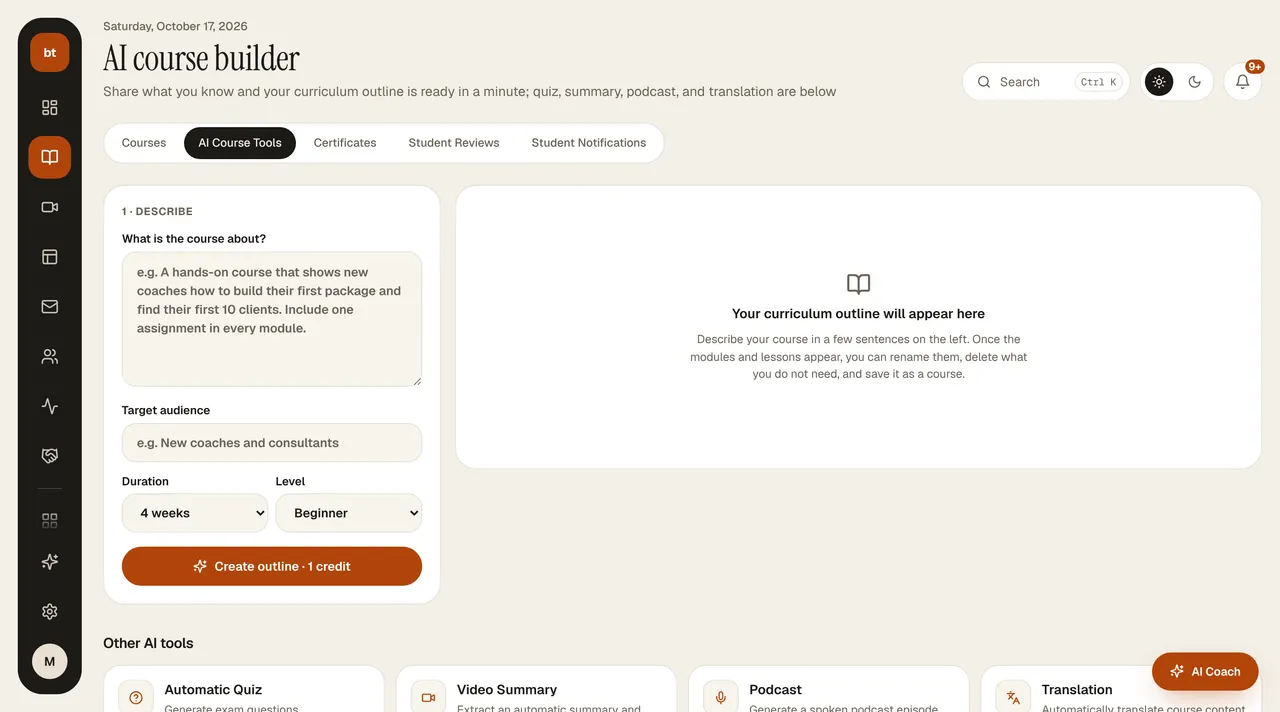
Below is More AI tools: quiz, video summary, translation, and podcast (goes to Studio › Podcast). Each tool works with the topic or lesson text you give in the form.
| Tool | What it produces |
|---|---|
| Curriculum (AI Course Builder) | A module and lesson plan from a topic and target audience; you edit it and save it as a course |
| Quiz | Multiple-choice questions from lesson content |
| Podcast | A one- or two-host episode script and audio episode (for all your episodes, Studio › Podcast) |
| Translation | Translation of lesson and page texts |
| Video summary | A written summary of a lesson video |
Tools that generate text use 1 credit; podcast voiceover costs an additional 1 or 2 credits per 1,000 characters. Review the output before adding it to the relevant field.