Creating a page with Page Studio
Pick a type, connect a product, answer two questions. AI designs your page to match your brand.
All new pages are created with Page Studio. The guided start never asks you for design knowledge.
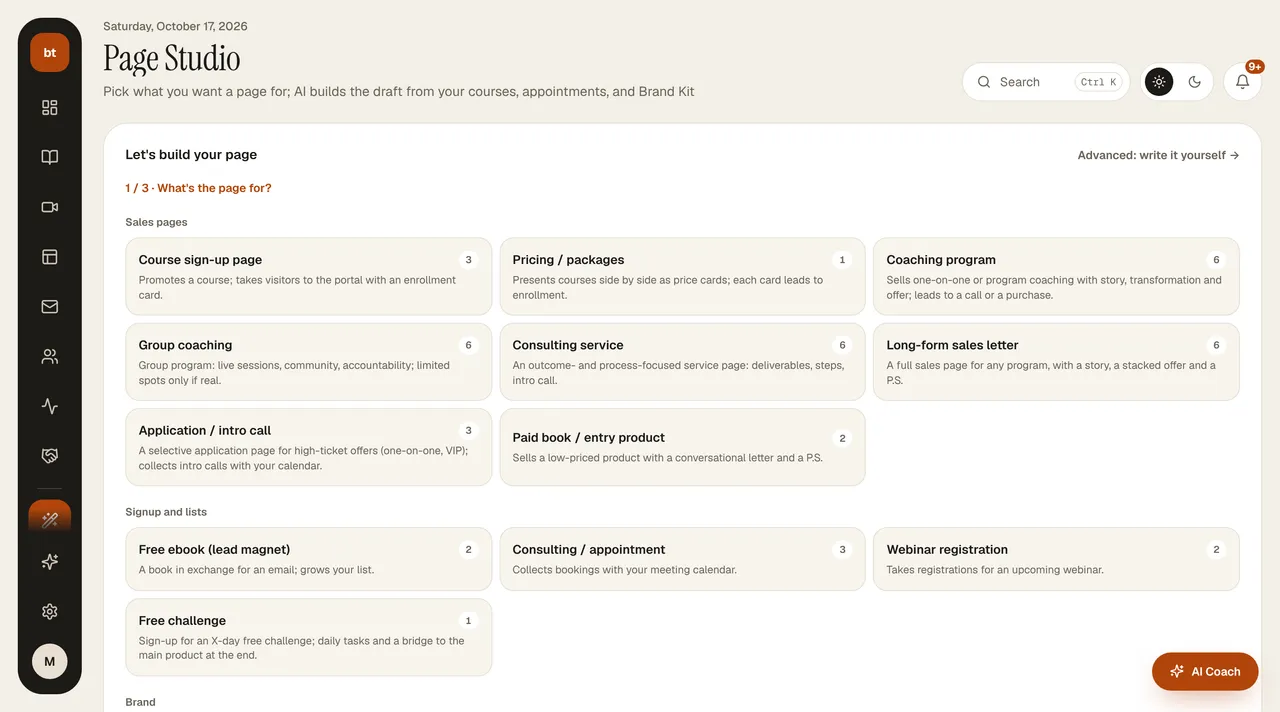
At the top of My pages, in the Which page should we build? box, choose a type (sales page, webinar registration, lead magnet, appointment, book form, thank-you), describe the page in one sentence, and click Build with AI; Page Studio opens with that sentence. Below, each page is a card showing its type, connected live blocks, visits, conversion, and its SEO + content score. The menu at the top right of a card lets you publish, unpublish, preview, duplicate, set as home page, and delete. On the right you'll find Page health (the average score and the pages with the most gaps), an AI Coach suggestion comparing your best- and worst-converting pages, and how many pages each live block is used on.
- Click My pages › New page.
- Choose the page type: course signup, free ebook, appointment, webinar registration, home page, or about me; there are also sales pages (coaching, consulting, application) and flow pages (thank-you, upsell, waitlist).
- Choose the product this page will sell or promote from the products in your account.
- Optionally, answer two questions (who you're speaking to, what your biggest promise is).
- Click Generate page. The page is built with your Brand Kit colors, your instructor profile, and the live card of the product you chose.
If you'd rather write your own brief, choose Advanced and enter free text.