Fixing a page with AI (revisions)
Type what you want, review the plan, and it's applied only if you approve. Every change can be undone.
The revision agent doesn't rewrite your page from scratch; it changes only the parts you ask for.
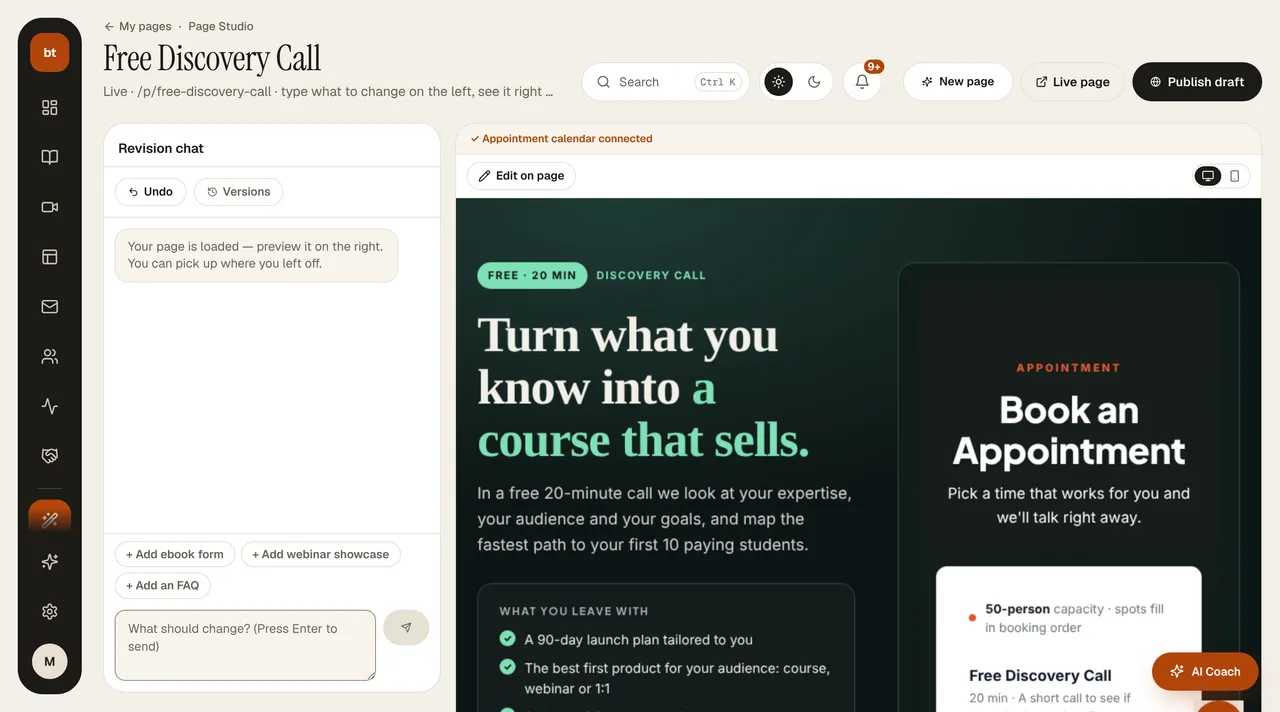
How it works
- In the Studio, type what should change in the box on the right. If you like, tap one of the suggestion chips above it (such as “Add FAQ” or “Strengthen the headline”).
- The AI first shows a change plan: which section, and what will happen.
- If you press Apply, only the changes in the plan are made. If you press Cancel, nothing on your page changes (the plan's credits are not refunded).
Versions and undo
- A version is saved automatically before every apply. You can return to the previous version with one click.
- Everything you do in the Studio is a draft. Your live page doesn't change until you press Publish.
Status strip
The strip above the preview tells you what the page is connected to: which live areas are connected (appointments, course card, ebook form, webinar, prices) and whether the numbers come from live data. If you click a missing item, a fix instruction is written into the revision box.
CreditsEach change plan costs 3 credits, deducted when the plan is ready; Apply doesn't use additional credits. If the AI asks you a question or the job fails, no credits are deducted.