Setup Wizard: set up your business in 4 steps
Role, Brand Kit, offer, and “Set up my business.” At the end, your pages, emails, and product are ready with the same branding.
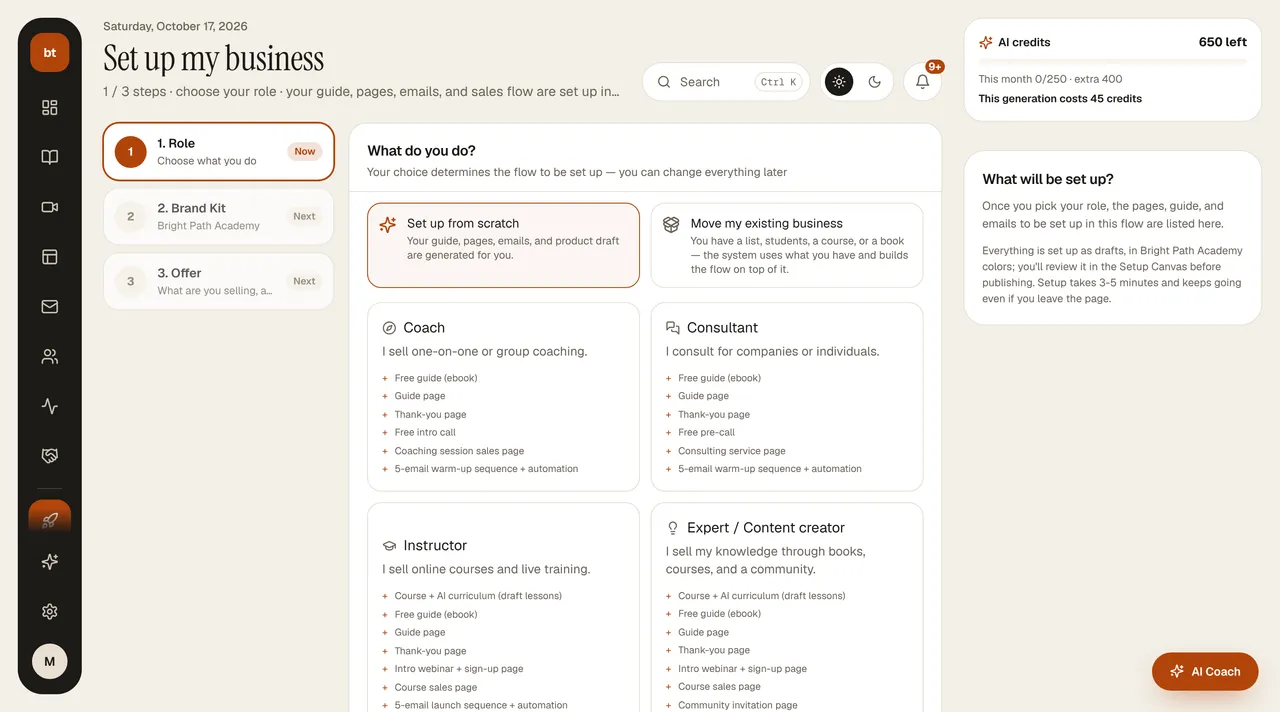
The Setup Wizard (Product › Set up my business) builds the skeleton of your business for you. It asks one question at each step and never asks for technical settings. Step cards (Done · Now · Next) are on the left; you can click a completed step to go back. The right column shows your AI credits and what will be set up for the role you chose.
Steps
- Role. Coach, Instructor, Consultant, or Expert / Content creator. Your role decides which pages and email sequences are set up.
- Brand Kit. Your brand name, color, logo, and instructor profile (name, title, photo, short story; you can add years of experience later from the Brand Kit). Everything you enter here flows automatically into all your pages, emails, presentations, and ads.
- Offer. What you sell: a course, calls, an ebook, or a program. If you already have a ready product, guide, or paid call, choose “Move my existing business” in the Role step; the wizard opens the “What you already have” step, where you check them off.
- Set up my business. A sales page, thank-you page, free resource (lead magnet), welcome emails, and sales emails are created in the same brand color.
When setup finishes, we take you to the Setup Canvas. You can see everything that was created there and change whatever you don't like.
CreditsYour first Setup is a gift. Every new Setup after that uses 45 credits.
If you already have a businessIf you have a list, courses, or pages on your site, use Move my existing business instead of starting from scratch.