Team members and permissions
Choose what you open to whom; money, plan, and team settings stay with you alone.
You invite team members from the Settings › Team screen. Each member is given a role; when a member enters the dashboard, they see in the left menu only the sections their role allows (money, plan, domain, integration, and team settings are yours alone). Instructors and co-hosts can see and edit the drafts in My pages; publishing belongs to the owner.
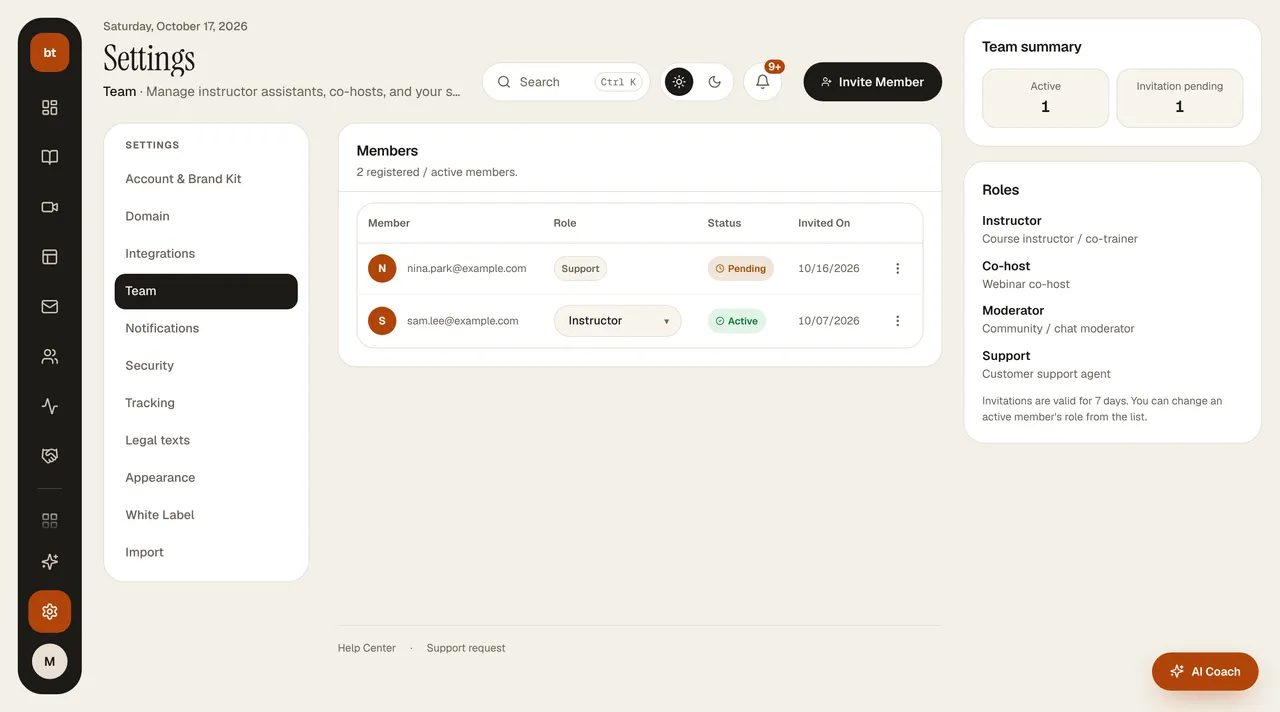
| Role | What they can access |
|---|---|
| Instructor | Courses and lesson content, products, webinars, AI Course Tools, certificates, video analytics, forms and surveys |
| Co-host | What the instructor can access, plus the community |
| Moderator | Community |
| Support | Support requests, customers, appointments, and meeting types, form responses (view only) |
Sensitive areas such as payment settings, bank transfer approval, refunds, plan and subscription, partner payouts, and team management are closed to all team members; only the account owner can access them. The number of team members is limited by your plan.
Oct 7, 2026 update
A member who accepts the invitation enters the dashboard with their own account; in the brand selector at the top right, both their own brands and the schools they are a member of (with a role label) are listed, and a member cannot close the school they belong to. On screens outside their role they get a "you can't access this module" warning; to widen access, the account owner changes the role in Settings › Team.
- Instructor: courses and content, products, webinars, AI tools, certificates, forms and surveys, podcast episodes, page drafts (publishing and unpublishing belong only to the account owner), ebooks, presentations, media, and designs.
- Co-host: what the instructor can access, plus the community; also calendar and appointment links, podcast, page drafts, and forms. They can only view A/B tests, not change them.
- Moderator: community and community management.
- Support: support requests, customers and contacts, appointments and appointment types, calendar and meeting links, chatbot settings, file uploads, viewing form responses (they can't change forms).
- Account owner only: the Telegram bot and announcements, Ad Center, payment providers, plans and subscriptions, bank transfer/refund/payment approvals, affiliate payouts, team, brand settings, billing, buying AI credit / quota packages, page publishing, and creating A/B tests.