AI Coach
An assistant that knows everything in your account and tells you your next step.
AI Coach reads your pages, courses, ebooks, webinars, email series, and Setup Canvas, and bases its suggestions on them.
- Ask questions like “Why are my sales low?” or “What should I send after the webinar?”
- It reads your email series and suggests fixes. Suggestions aren't saved automatically; they're applied only when you click Apply.
- The “Next step” suggestion in Setup Canvas also comes from AI Coach.
The AI Coach page
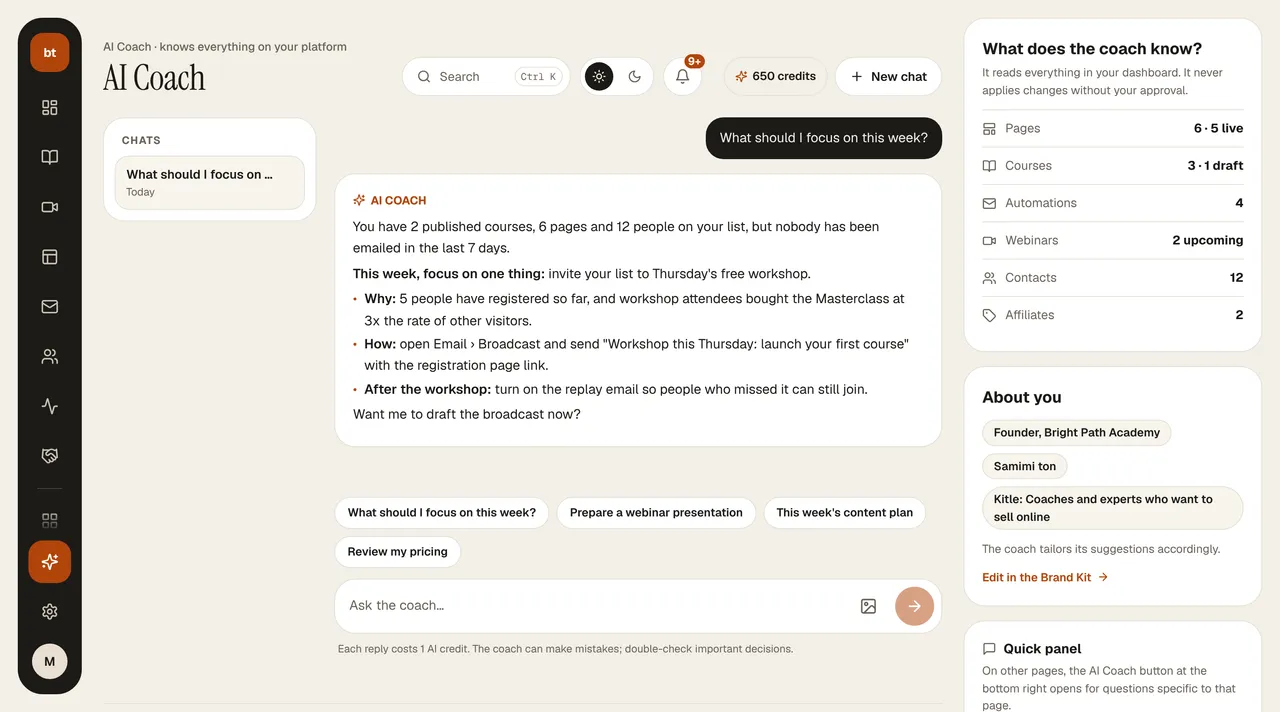
The AI Coach button at the bottom of the menu on the left opens the full page (/admin/ai-koc):
- Chats (left): each topic is saved as a separate chat; click one to pick up where you left off, and delete it with the trash icon when you hover over it. New chat is in the header.
- Chat (middle): type your question or click one of the ready-made questions below it; you can attach an image. If the coach did some work (a course draft, a webinar plan, an email suggestion), it appears as a card under the reply; Open takes you to the relevant screen.
- What does the coach know? (right): your counts of pages, courses, automations, webinars, contacts, and affiliates. Each row takes you to the relevant screen.
- About you: your title, tone of voice, and target audience from your Brand Kit. The coach tailors its suggestions to them; change them with Edit in the Brand Kit.
On other pages, the AI Coach button at the bottom right opens a quick panel specific to that page; Full page in the panel's header brings you to this page. Each reply costs 1 AI credit; your remaining credits are shown in the page header.
AI Agent findings (add-on)
If your AI Agent System add-on is on, the Account › AI Agent Findings page (a badged entry also appears in the menu) shows the opportunities and problems the agents found while scanning your email, funnel, sales, webinars, and social media. When you click Apply on a finding, the agent only produces a draft (a page, a social post, or an email series) and leaves it in the relevant section; publishing is up to you. Page and text generations are deducted from your AI credits; you dismiss a suggestion that isn't useful with Ignore. If the add-on is off, the same page redirects you to My Subscription. No suggestion is ever applied without your approval.