Managing the customer affiliate program
Let your students and customers refer you; manage commission, approval, and payouts.
The affiliate program lets your customers recommend your products with their own referral link and earn a commission on each sale. It is available on the Girişimci plan and above (and during the trial).
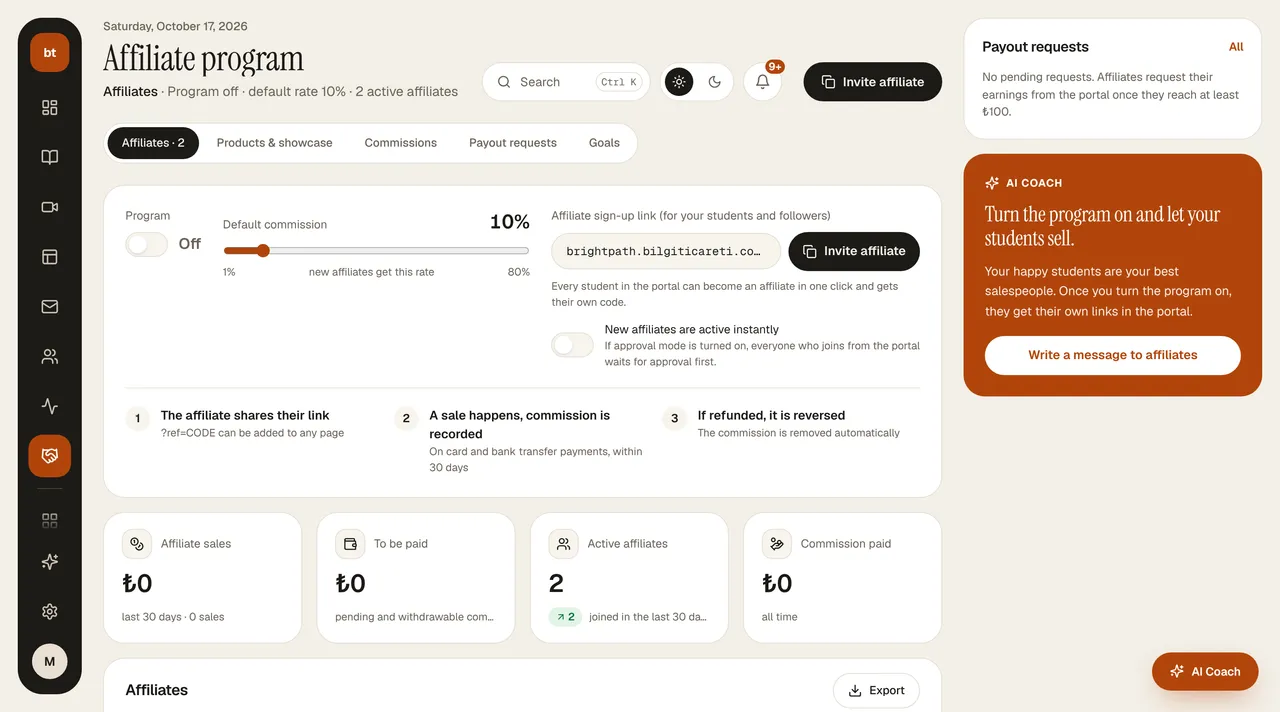
Turning the program on
- On the program card at the top of Affiliate Program › Affiliates, turn on the Program switch.
- Choose the rate with the Default commission slider (1–80%); it saves when you release it. This rate applies to new affiliates; you change an existing affiliate's rate one by one by clicking the rate in the table (if it's different, it says “custom”).
- Invite affiliate copies the affiliate sign-up link (
yoursite/portal/affiliate); send it to your students and followers.
Below the card are the indicators: sales from affiliates in the last 30 days, commission to be paid (with the number of pending requests), active affiliates, and commission paid. The table shows each affiliate's code, number of sales, revenue brought in, commission, rate, and status; Pause makes the code inactive, and Export downloads the list as a CSV. On the right are the pending payout requests and AI Coach's suggestion.
While the program is off, nobody can create a new link and the portal shows an information message; existing links and commissions are not affected.
How it works
- Your customer clicks Affiliate › Create my referral link in the portal; their link looks like
yoursite?ref=CODE.?ref=CODEcan be added to any page of your site (for example, a sales page). - If the person who clicks the link buys within 30 days, the sale is credited to that affiliate. The last clicked link counts; nobody can earn commission on their own purchase.
- For card (iyzico / PayTR), bank transfer, and Stripe sales alike, the commission is created as Pending once the payment is completed. For bank transfers, it is recorded the moment you approve.
Rate
The default commission is the rate you set in the program. In Affiliate Program › Affiliates, you can change the rate per code or make a code inactive.
Hold period, cancellation, and payout
- In Affiliate Program › Commissions you see the incoming commissions: totals for Pending, Withdrawable, Paid, and Canceled / refunded at the top, with the breakdown below; you can filter by status and download a CSV. Each commission stays pending for 14 days after the sale, then becomes Withdrawable on its own; you don't need to approve it separately.
- If you see a sale that breaks the rules during the hold period (an affiliate buying for themselves, a fake order, spam, or misleading promotion), click Cancel on the row and write your reason. The commission is deducted from the balance and the reason is sent to the affiliate. A commission that has passed 14 days or has been paid can't be canceled.
- An affiliate requests their earnings from the portal as a payout request (at least ₺100, IBAN). Requests land in the Affiliate Program › Payout requests tab (the number on the tab is the number of pending requests): Approve → send the money to the IBAN → Paid. When marked Paid, the related commissions also count as paid.
- When you give a full refund, the unpaid commission is canceled automatically and deducted from the affiliate's balance.
Goals
In Affiliate Program › Goals, you define milestones such as “10 referrals = ₺500 bonus”. When an affiliate reaches the threshold, the bonus is added to their earnings.