Getting paid: connect your own account
Card payments go to your own iyzico or PayTR account, and bank transfers go to your own IBAN.
Bilgi Ticareti doesn't hold or act as an intermediary for the money your students pay. To accept card payments, you connect your own payment provider account; the money goes straight to your account.
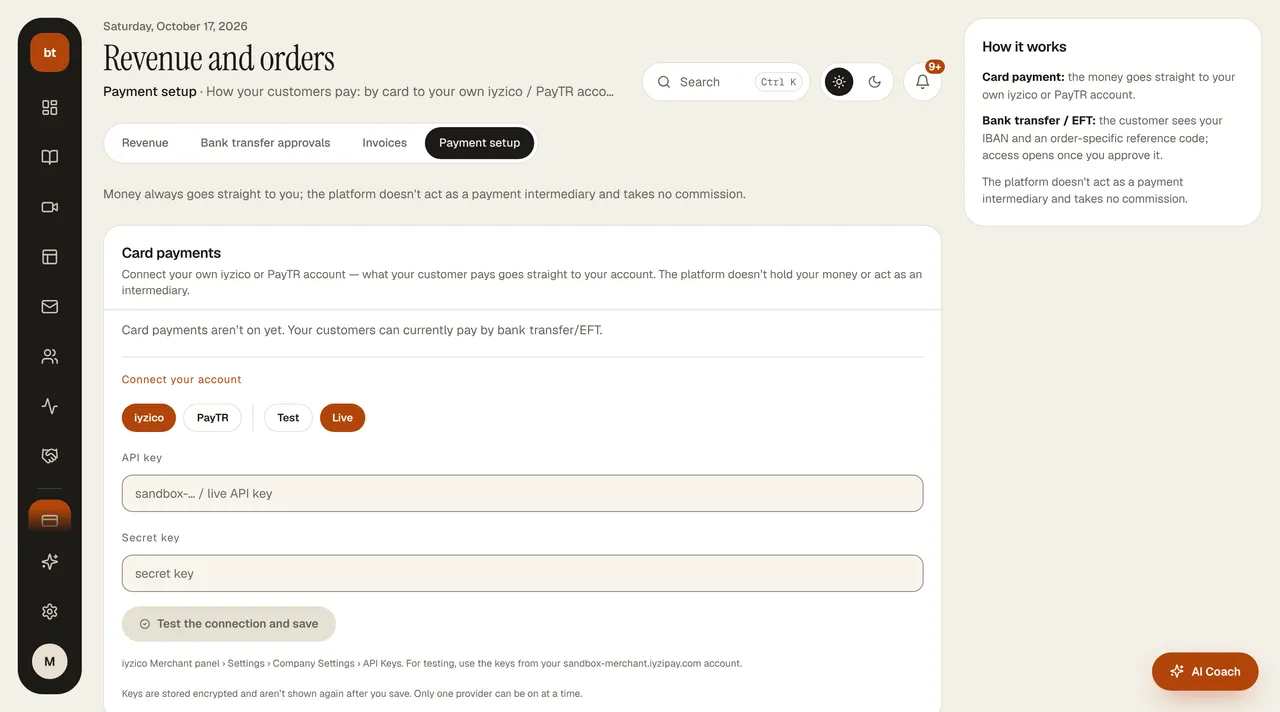
Card payments
- Open a merchant account with iyzico or PayTR (the provider's application requirements apply).
- In Revenue & Payments › Payment setup, choose the provider and enter your API details.
- First make a trial sale in test (sandbox) mode, then go live. In test mode, only the business owner can make a trial payment (team members and students try it by bank transfer); test sales are not included in commission, e-documents, or sales reports.
Bank transfer
If you don't have a card account, you can sell by bank transfer. The customer places an order and your IBAN details are shown; when you see the payment, you confirm the order from the dashboard. On confirmation, access is opened and your purchase automations are triggered.
SecurityYour payment keys are stored encrypted and are never sent to the browser.
You are the sellerYou are the seller and the invoice issuer toward your customer. Fill in Settings › Legal for your legal pages.