Issuing a refund
Refund a sale and close access.
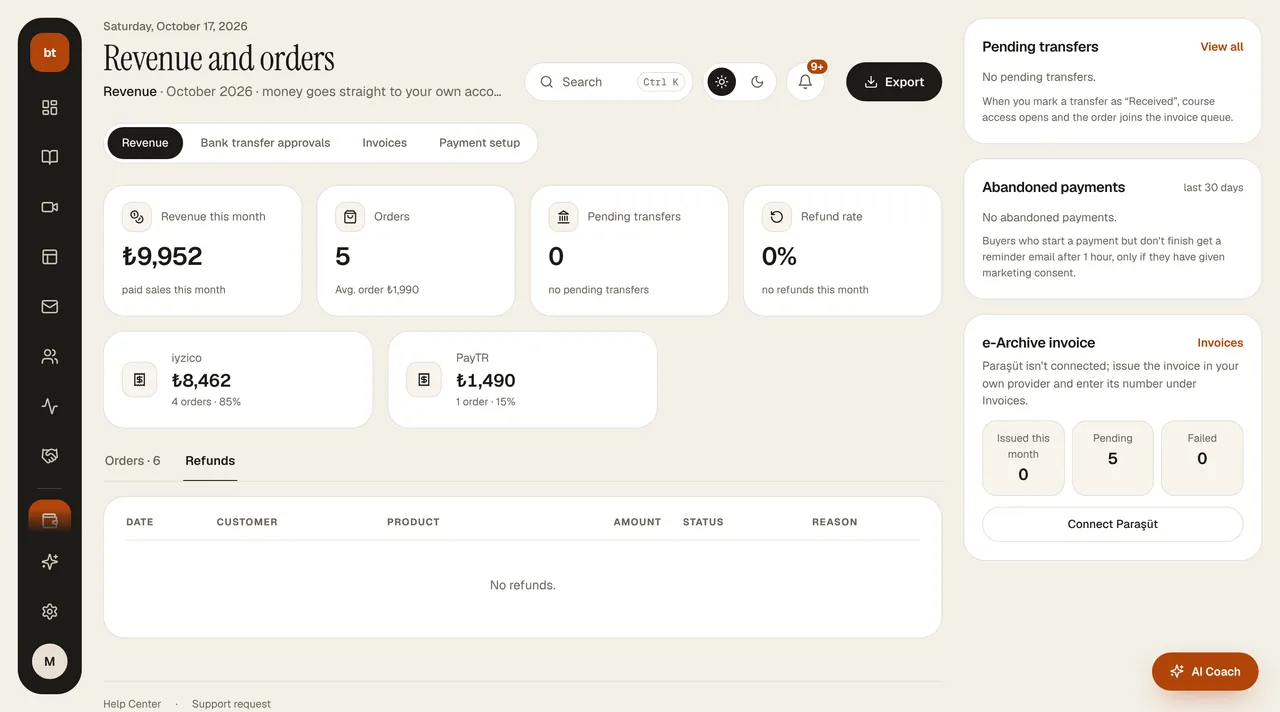
- In Revenue and orders › Revenue, in the Orders table, click Refund at the end of the row (or from the Invoices list, where you can also issue a partial refund by entering an amount). A refund made from the Revenue screen is a full refund; you can enter a reason if you like. Completed refunds are listed in the Refunds tab of the same screen.
- For card payments (iyzico / PayTR), the refund is made automatically from your payment provider account; for bank transfers, the refund is recorded in the dashboard and you send the money to the customer's account yourself.
- With a full refund, the customer's access to the product is closed; for a membership sale the membership is canceled, and for an appointment sale the appointment is canceled. A partial refund does not close access.
- If an e-Arşiv invoice (Turkish electronic invoice archive) was issued for the sale, you'll get an “issue a refund invoice” reminder after the refund.
Your refund terms are written on your Cancellation and Refund Policy page; this page is generated automatically from your Settings › Legal information.