Analytics screens
Overview, Traffic, Sales, Customers, Funnel, Email, Social, Events, Course & Video.
All measurements are in one menu. The Webinar, Appointments, Email & Automation, CRM, and Social Media pages don't have a separate statistics tab; the link in each one's header brings you to the relevant tab here. The Overview, Sales, Email, and Events tabs work with a shared period selector (7, 30, 90 days, or 1 year); the selector is on the right of the tabs, and the period you choose is kept across tabs.
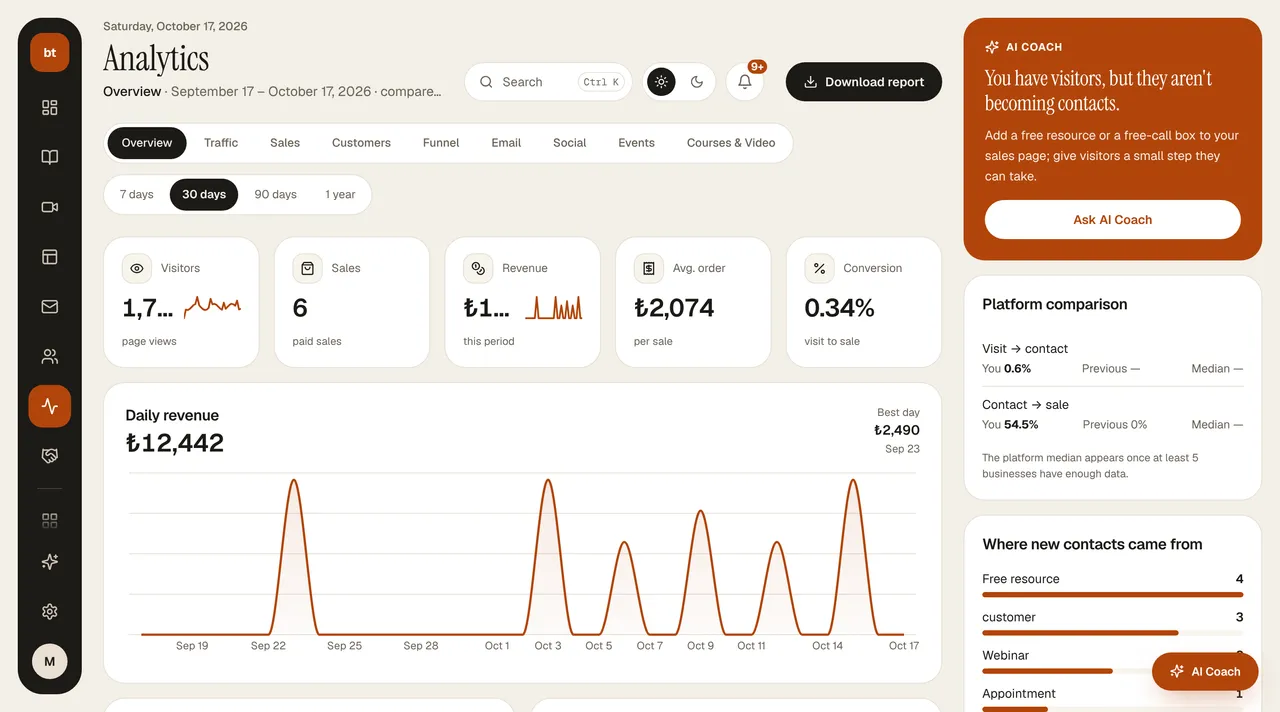
Overview tab
Five metrics at the top: Visitors, Sales, Revenue, Avg. order value, and Conversion (from visit to sale); each is compared with the previous period of the same length. Below are the Daily revenue chart and the top day; the Sales funnel (visit → new contact → call or webinar → sale) and the biggest drop-off; Traffic sources (the ?k= tag on the sales link, or the referring site); Products by revenue; and Top pages (by visits, with the conversion rate from My pages). In the right column are the AI Coach's recommendation, a comparison with the median of other instructors on the platform, and the source of new contacts. Download report downloads daily visits, new contacts, and revenue as a CSV that opens in Excel.
| Tab | What it shows |
|---|---|
| Overview | Metrics, daily revenue, sales funnel, traffic sources, products by revenue, top pages |
| Traffic | A "right now" view: who has been on your site in the last 5 minutes, people who opened the checkout page but haven't paid yet (last 30 min), today's sales and webinar registrations; a minute-by-minute visitor chart for the last 30 minutes, today's top source and most-read page; a live feed of the last 24 hours (sales, checkout page, webinar registration, new contact, appointment, page visit). Refreshes every 30 seconds. |
| Sales | Revenue, breakdown by product and source, sales from the exit offer |
| Customers | Total customers, new customers this month, lead-to-customer conversion, average customer value, 12-month growth, and most valuable customers |
| Funnel | The step-by-step result of the funnels you built: how many people continued at each step and where they dropped off. You build the funnel in Marketing & Sales › Funnel |
| Sends, opens, clicks, bounces; performance by series | |
| Social | How many posts were published on which platform in the last 30 days, a daily publishing chart, and recent posts |
| Events | Webinar registration and attendance, appointments; the detailed statistics screen for each opens from here |
| Course & Video | Student progress, views, completion |